
Home
 
Video Tutorial: Custom RPM Gauge and Graph
This video illustrates CANCapture's ability to create user panels using fully customizable gauges.

It shows how to create a user panel from scratch and add a themed gauge that is linked to any J1939 or user defined CAN variable.  It also shows how users can manipulate individual properties of a gauge to create any style and look possible.  In this example we create a gauge that links to SAE J1939's "Engine Speed" variable.

The video also illustrates how to create "State Indicator gauges" that can be used to display a unique LED or image for any combination of states and values.  In this example, we create an LED that is green when RPM < 3000, turns yellow when 3000 < RPM < 4250, and turns red when RPM > 4250.  

Finally, this video shows how to create a new "Graph" functional block, link it to the flow of CAN data (replayed from a log file in this example), and add variables to the graph window.


Note: The playback of the recording is choppy due to bandwidth limitations - actual gauge and graph usage is smoother.
 
CANCapture Overview

CANCapture is a flexible, powerful, and cost-effective software application for capturing and analyzing traffic on a controller area network (CAN) bus.

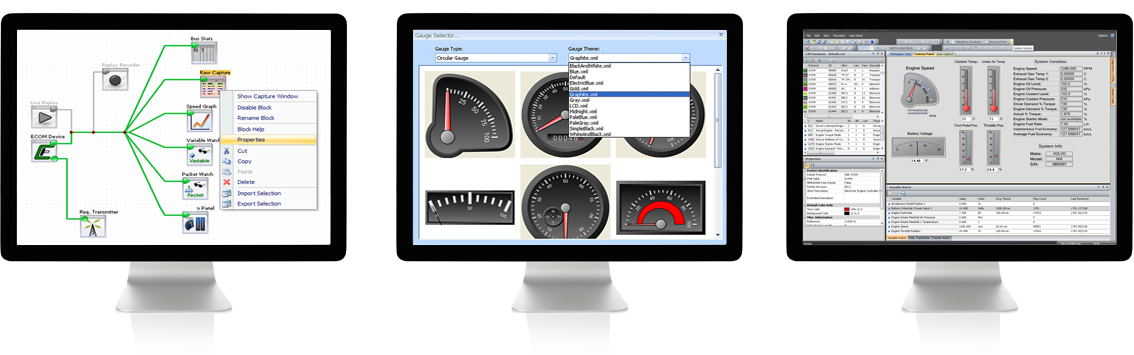
CAN Analysis Software Images

CANCapture was designed with engineers in mind, and during its evolution, it has been continually adapted to fit the needs of all aspects of CAN development.

  • Flexible
    • Fully customizable data flow management - wire up your CAN data however you want, load and modify the CAN database, and connect or disconnect functional blocks without ever having to stop the "live" capture.
    • Database manager is integrated into the application - instantly jump to definitions, search the database, and add variable watches, graphs, etc. Full J1939 database and support included!
    • No license keys! Install CANCapture on every computer in your organization; there's no longer any need to share a laptop.
    • Connect multiple ECOM devices in the CANCapture flow chart to create virtual gateways that can bridge, manipulate, filter, and analyze activity between isolated buses.
  • CAN Analysis Software Images
  • Powerful
    • A colorized raw packet list lets you easily visualize and analyze the data on the CAN bus by allowing colors to be assigned to messages in the CAN database. As each packet is received by a "Raw Capture" block, it gets assigned a color and is displayed and scrolled in real time.
    • Custom scripting allows for everything from end-of-line testing procedures to on-the-fly data encryption/decryption. Implement advanced filters beyond the capabilities of the standard packet filter by using the C/C++ like syntax. Plenty of examples are available.
    • User panels allow real-time display of 1000's of variables on sophisticated gauges, sliders, thermometers, numeric indicators, text boxes, etc.
    • J1939 diagnostics block can request and display active/historic/pending diagnostic trouble codes (DTCs) and freeze-frame data.
    • Seamless integration of NMEA-2000 Fast Packet, J1939 multipacket broadcast announce messages (BAM), and destination specific connection management (CM) messages.
    • CAN Analysis Software Images
    • Record data in the field, and then replay and analyze it later with full or variable speed playback. Let your clients log the data and/or go back and analyze a recorded session with different variables being watched or graphed. Alternately, log data packets or variable watches to excel for in-depth post-analysis.
    • Create standalone EXE files custom built from any CANCapture configuration for distributing to end-users and technicians.
  • Cost-effective
    • $995.00 for both hardware and software. Everything you need to get started is included. Buy it here!
    • 30-day money back with a 5-year hardware guarantee - you won't find better value for the price.
    • No need for upgrade packages or add-ons because every feature is always included - custom scripting, J1939 support, .dbc CAN database importing, professional user panels, etc.